
I’ve watched this happen more times than I can count
Part of my day-to-day work is sitting close to WordPress site owners and admins — helping them maintain, troubleshoot, and improve their sites. And there’s a small, specific moment I’ve watched repeat itself over and over, across very different people and very different sites.
Someone needs an image. They open a separate AI image generator in another tab. They type a prompt, generate a few options, pick the one they like, download it to their computer. Then they switch back to WordPress, open the Media Library, click upload, find the file in their downloads folder, upload it, wait, and finally insert it into the post they were actually trying to write.
Five separate steps to do one simple thing. Nobody complains about it loudly — it’s not broken, exactly. It’s just quietly annoying enough that everyone has simply accepted it as how this works.
That gap is what MediaLume fixes.
Why this gap existed in the first place
AI image generation became genuinely mainstream over the last couple of years. There’s no shortage of tools that can turn a text prompt into a striking image in seconds. But almost all of them were built as standalone destinations — a website you visit, a separate app you open, a tool that has no idea WordPress exists.
So even as “AI can generate images” became completely unremarkable, “WordPress can generate images” never really arrived. The Media Library — the place every WordPress user already goes to manage their images, every single day — stayed exactly as it’s been for years: a place you *upload to*, never a place that *creates* anything.
That disconnect is the real cost here. Not that AI image tools didn’t exist — they’re everywhere. It’s that none of them lived where WordPress users actually work.
Meet MediaLume
MediaLume adds an AI image generation tab directly inside the Media Library you already use — the same modal you open every time you add an image to a post. No new dashboard. No new screen to learn. You open the Media Library exactly the way you always have, and generating an image is just another tab sitting right next to “Upload Files.”
A few things matter here, and I want to be specific about each one:
- This isn’t a generic AI black box — MediaLume primary generation model is Flux, one of the strongest open image-generation model families available right now — known for sharp detail, strong prompt-following, and realistic output that holds up next to the best closed-source tools on the market. This isn’t a watered-down placeholder model bolted onto a plugin for the sake of having an “AI” feature. Besides you can use any of the most popular models known for generating best quality image includes Flux 1, Flux 2, Ideogram, Recraft, Nano Banana.
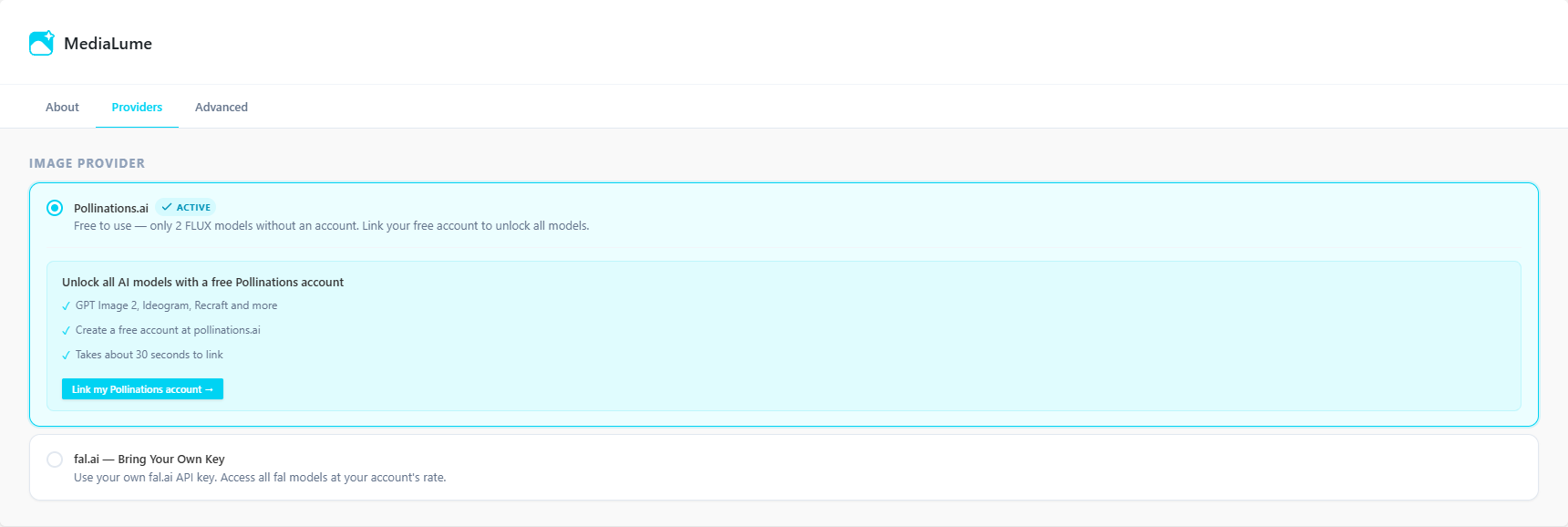
- Free tier, zero setup — The moment you activate MediaLume, it works — through Pollinations.ai, giving every user instant access to 2 Flux models with no account, no API key, and no cost. You don’t configure anything to try it.
- Connect your own Pollinations account (optional) — If you want access to the full range of available models, you can connect your own Pollinations.ai account and unlock everything using your own Pollinations credit — still inside the same simple interface.
- fal.ai, bring your own key (optional) — For users who specifically want fal.ai’s huge range of lineup, MediaLube supports a simple Bring-Your-Own-Key setup. fal.ai is one of the most recognized infrastructure providers for high-performance Generative AI inference in the AI image space — this isn’t an obscure or unproven backend.
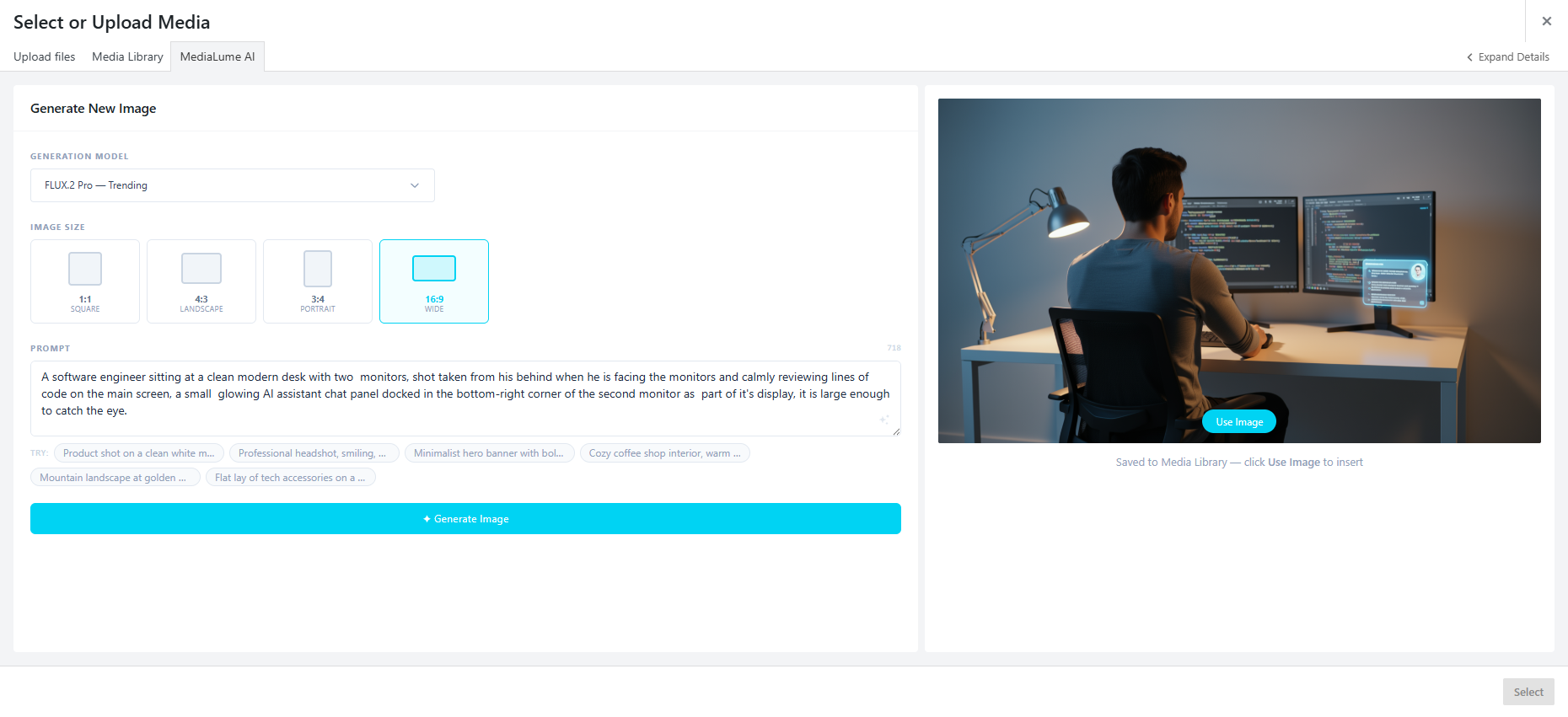
And once an image is generated, it’s downloaded and saved permanently into your own Media Library — not a link to some third-party URL that could change or disappear later. It behaves exactly like every other image you’ve ever uploaded, because as far as WordPress is concerned, it is one.
Why I built it this way
A few decisions here weren’t obvious at first, so it’s worth explaining the reasoning.
- Every image request runs through PHP on the server, never the browser — This keeps API keys secure — your fal.ai key, if you add one, never sits exposed in client-side code — and it sidesteps CORS restrictions that would otherwise make direct browser-to-API calls unreliable.
- Free-first, not paywalled-first — I wanted someone’s very first experience with MediaLume to be “this just works,” not “create an account, then maybe you can try it.” The Pollinations free tier exists specifically so nobody has to make a decision before they’ve even seen the value.
- Deep integration over a separate screen — This was the most genuinely difficult part of the build. WordPress’s Media Library is built on an older Backbone-based JavaScript framework that has shifted in small ways across major WordPress versions. Making MediaLume work cleanly from WordPress 5.0 through the latest release meant handling several different internal media-frame behaviors, not just one. It would have been far easier to build a separate, simpler standalone admin page instead — but that would have recreated the exact problem I was trying to solve: another screen, another context switch.
Built in collaboration with Claude
I want to be upfront about this part, because it’s relevant to how I actually work now, not just how this specific plugin came together.
MediaLume was built in close collaboration with Claude — I used Claude Code throughout development, especially for the harder debugging work around WordPress’s shifting internal media APIs across versions, and for iterating quickly on the provider integration logic. What Claude didn’t do was decide what this plugin should be, who it was for, or which tradeoffs mattered. Those decisions — the free-first architecture, the choice to integrate deeply into the existing Media Library instead of building something separate, which providers were worth supporting and why — were mine.
That division is exactly the argument I’ve made elsewhere about AI and software work in general: execution gets faster and easier. Judgment about what’s actually worth building, and why, doesn’t get automated. MediaLume is a small, concrete example of that distinction in practice, not just a claim I’m making in the abstract.
Where to get it
MediaLume is live now on the WordPress.org plugin directory — free to install, with the Pollinations free tier available immediately and no setup required to try it.
If you install it and run into something that doesn’t work the way you expect, or there’s a feature you wish it had, I’d genuinely like to hear about it. This is an early release, and the roadmap ahead is shaped directly by what real usage surfaces.
Built something similar, or thinking about it? I’d like to hear how you’re approaching the same kind of problem in your own work.
Write a Comment